See every pallet. Prove every move.
WHouse3D replaces flat bin-location lists with a live 3D view of your racking. It checks each pallet move against HACCP, segregation and rack-load rules, and keeps an audit trail that is ready for your auditor. It works alongside your WMS, TMS and ERP rather than replacing them.
- Runs in a browser
- No CAD drawings needed
- Built for cold-chain & food-grade sites
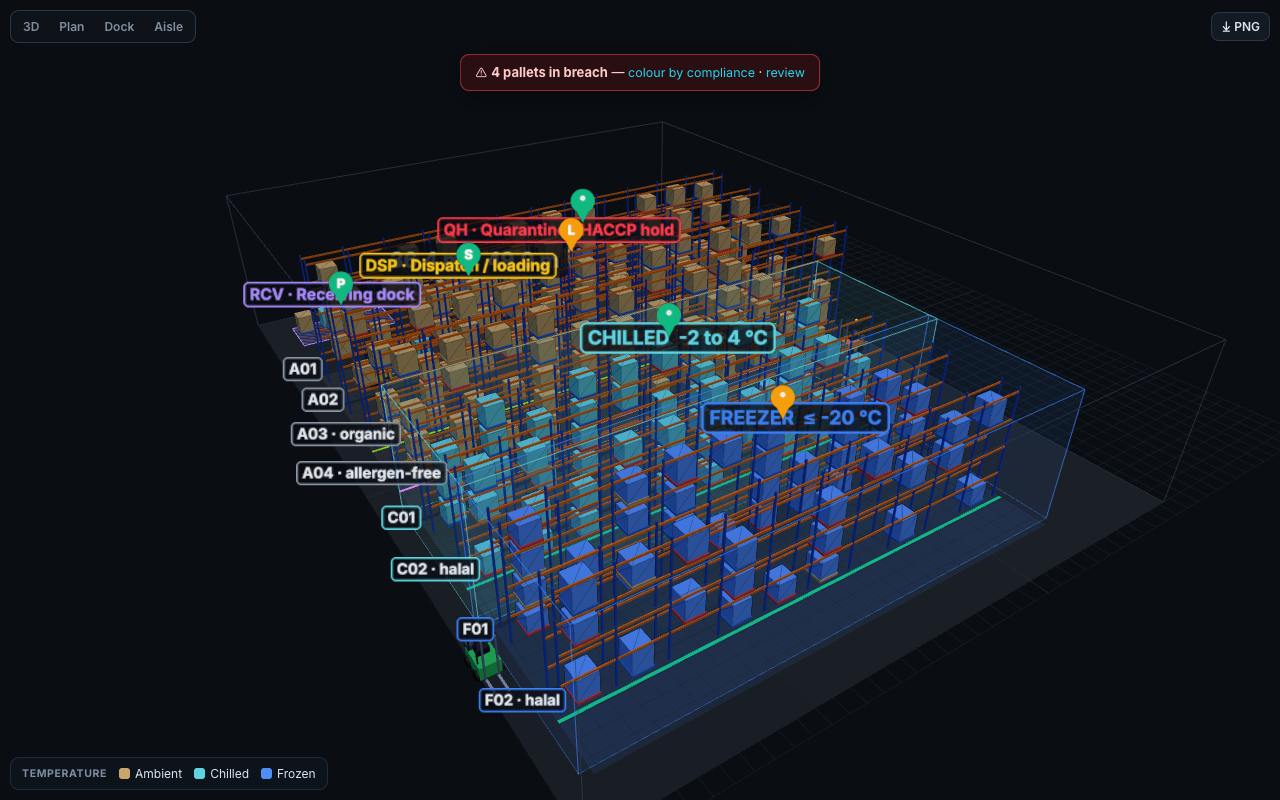
Everything you can try on this site runs on simulated data. The interactive demo uses a fictional site, Illawarra Cold & Dry DC, with made-up stock, clients, operators and sensor readings. It runs entirely in your browser and connects to no live warehouse, WMS or sensor. Production capabilities are labelled Planned wherever they appear.
Your WMS knows what is in stock. WHouse3D shows where it is, and whether it should be there.
Most warehouse systems describe stock as rows in a table, such as “Aisle 04, Bay 12, Level 2”. Spatial and food-safety mistakes are hard to spot in a table: chilled stock left on a warm dock, allergens racked above allergen-free lines, or a hold pallet edging toward dispatch. They often surface for the first time in an audit or a recall.
Flat lists hide spatial risk
Segregation, temperature zones and rack loads all depend on where stock physically sits. A table can't show that at a glance.
Checks happen after the move
Paper HACCP logs and end-of-shift reviews catch breaches hours later. WHouse3D checks the move before the pallet is put away.
Audits mean a scramble
Pulling movement history, holds and monitoring records into one pack takes days. WHouse3D keeps them together continuously.
What you can try in the demo today
Each of these runs in the interactive demo on simulated data. The Solutions page sets out the production modules that are planned.
3D spatial twin
Racking, cold rooms, docks and a quarantine cage in 3D. Colour pallets by temperature, status, expiry, compliance or 3PL client. Orbit, filter by certification and toggle zones or levels.
Compliance rules on every move
Each move is checked against temperature, Halal, Kosher, Organic, allergen, hold/expiry, FEFO and AS 4084 rack-load rules. Breaches are locked and logged. Warnings need a reason.
HACCP monitoring
Checkpoints for chilled and freezer probes, dock clean-down, bait stations and the quarantine cage. Each has critical limits and a frequency. Out-of-spec readings offer a whole-zone hold.
Tamper-evident audit trail
An append-only, hash-chained log of every move, blocked move, hold, release and dispatch. Verify chain shows that any edit is detected. Exports to CSV and JSON.
NFC / QR tap-to-move
Tap the pallet tag, tap the bay tag, then validate and confirm. You can print QR label sheets for pallets, bays and checkpoints. In the demo, taps are simulated by clicking. Web NFC works on Android Chrome.
Audit-ready reports
A printable HACCP compliance report with sign-off lines, a stocktake manifest with variance columns, and a pallet-hire exposure statement, plus JSON backup and restore.
A spatial and compliance layer that complements your WMS, TMS and ERP
WHouse3D is not another WMS. Your existing systems stay the system of record for orders, stock and finance. WHouse3D adds the spatial picture and real-time food-safety checks on the floor.
Systems of record
- WMS Bin-list import
- TMS Planned
- ERP Planned
WHouse3D
- 3D spatial twin of the racking
- Food-safety & segregation rules engine
- HACCP monitoring & zone holds
- Hash-chained audit trail & reports
The floor
- NFC / QR tags In demo
- Handhelds & phones Browser
- Temperature sensors Planned
Today the demo imports flat WMS bin lists (“Aisle 04, Bay 12, Level 2”, A02-07-L1, 04-12-2) with SKU, batch and expiry. Live two-way connectors to specific WMS, TMS and ERP products are on the roadmap and are not yet built.
Try it in five minutes
The demo is the full working prototype, loaded with a fictional site that already contains deliberate exceptions for the rules engine to catch: yoghurt sitting in ambient, peanut butter in the allergen-free row, pork in the Halal freezer, expired milk, and three pallets on HACCP hold.
Works best on a laptop or desktop. Your changes stay in your own browser only. Use Reports → Reset demo to start again.
- Orbit the 3D twinSwitch the colour mode to Compliance to see breaches and warnings across the site.
- Try a bad moveSelect a chilled pallet and target an ambient bay. The move is locked and the attempt is logged.
- Show valid baysEvery empty bay turns green, amber or red for the selected pallet.
- Log a HACCP readingEnter an out-of-spec freezer probe reading on HACCP checks, then place the whole zone on hold.
- Run the tamper testOn Audit trail, run the tamper test and watch chain verification fail at the edited entry.
Demonstration vs. production
The demo shows the product experience. A production deployment adds the multi-user backend, server-side security and live connections listed on the right, which are not yet built.
| Area | Interactive demo (today) | Production deployment (planned) |
|---|---|---|
| Data | Simulated Fictional site, stock and clients, stored in your browser only | Planned Your site, layout and stock in a hosted, access-controlled database |
| Users | One device. Operator roles can be switched in the top bar | Multi-user sign-in and role-based permissions, with every handheld updating live |
| Audit trail | Hash-chained and tamper-evident in the browser (not cryptographically signed) | Server-signed SHA-256 chain in an append-only store |
| Temperature | Readings entered by hand or simulated | Live loggers and probes, with excursions placing holds automatically |
| Tags | Taps simulated by clicking. QR labels print. Web NFC on Android Chrome | NFC tags written at receiving, plus in-app camera QR scanning |
| Site capture | Dimension builder, blueprint tracing, scan-file import, and a simulated scan | On-site LiDAR capture producing your twin |
| WMS / TMS / ERP | Flat bin-list import | Two-way connectors, scoped to each customer's systems |
Built for food-grade and cold-chain operations
3PL logistics
Show each client their stock and segregation, and track hire-pallet exposure per client.
Cold storage
Chilled and freezer zones, dock-dwell risk and monitoring checkpoints in one view.
Food manufacturers
Allergen, Halal, Kosher and Organic segregation enforced at put-away.
Commercial warehouses
Rack-load checks, FEFO and holds for any site that keeps stock in racking.
See WHouse3D on a layout like yours
Tell us about your site and we'll arrange a guided walkthrough. We'll cover your zones and certifications, how WHouse3D would sit alongside your current systems, and what a pilot could look like.
What to expect
- A 30–45 minute guided session
- A walkthrough using a layout close to your operation
- A frank discussion of what exists today and what is planned
Your details
We use your details only to respond to this request. We don't share them or add you to a mailing list.